Ski Tracks
- 3.8
- Rating
- 500.00K
- Installs
- Free
- Price

 Analysis by App-foxy
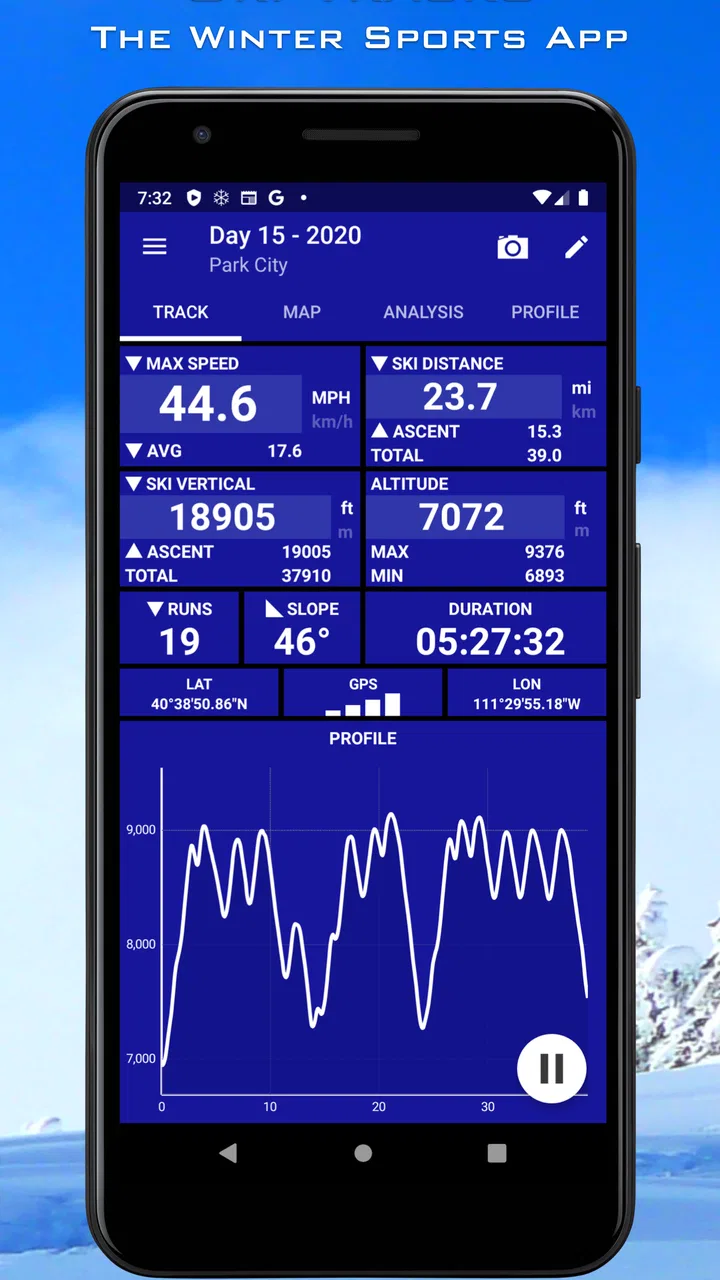
I like ski apps that stay focused on the day on the mountain instead of trying to become a complete social network, training platform, or travel planner. Ski Tracks takes that narrower approach. It is a free sports app from Fitness & Sports apps that I use to record a day’s movement on snow, with attention on speed, distance, altitude, and overall performance. That sounds simple, but it changes how useful the app feels: it is less about telling me where to ski and more about helping me look back at what I actually did.
The app has been available since January 12, 2013, and its long presence gives it a familiar, established feel. It is rated 3.8 on average from around 9.5 thousand ratings, with more than 500 thousand installs. Those figures suggest a sizeable audience, although they also tell me not to treat it as a universally loved tool. My experience is that Ski Tracks makes the most sense for recreational skiers who want a personal record without committing to a complicated training system.
What Ski Tracks is really useful for on a ski day
The clearest benefit is that it turns a day of skiing into something I can review afterward. Rather than relying on memory, I can check how much terrain I covered, how high I went, and how fast I moved. That is especially useful when a day feels either very productive or surprisingly short. A quick glance at the recorded session can show whether I spent most of the time skiing, riding lifts, taking breaks, or moving between areas.
You May Also Like

 Blood Strike: 2.5 Anniversary
Blood Strike’s Loadouts Turn Every Drop Into a Tactical Gamble
A close look at Blood Strike’s custom loadouts: how fast access to signature weapons reshapes its battle royale rhythm, rewards preparation, and narrows the gap between fights.

 Pandora - Music & Podcasts
Pandora’s Music Is Easy to Start, but Harder to Recover
Pandora’s strength is its low-effort path from a seed to a station. Its weak spot is how much confidence it asks you to place in connection, setup, and quiet recovery.

 8 Ball Pool
 Is Built on Rivalries, Rematches, and Routine
A close look at the rivalries, rematches, shared routines, and unanswered safety questions that turn a quick pool match into a persistent mobile community.

 Samsung Music
’s Quiet Strength Is Playing What You Already Own
Its reach comes less from spectacle than from dependable access to a personal library. That simplicity is both the app’s strongest retention engine and its ceiling.

 AccuWeather: Weather Radar
AccuWeather Review: A Quick, Clear Forecast for Everyday Decisions
For everyday plans, the best forecast is the one you can understand quickly. AccuWeather makes rain timing, radar, and local conditions easy to act on, with a few trade-offs.

 Hill Climb Racing
Why Hill Climb Racing Still Turns Crashes Into One More Run
A tiny car, a bumpy hill and one more upgrade: Hill Climb Racing keeps resurfacing because its simple chaos makes every near-miss feel personal.
More From Our News Desk



I find that distinction helpful because skiing is full of misleading impressions. A busy morning can feel long even when the actual time on the slopes was limited. Conversely, a quiet day with efficient lift access can produce more runs than expected. The value here is not just the headline speed or distance figure; it is the ability to compare my impression of the day with a record of it.
The app belongs firmly in the sports category, but I would not describe it as a complete coaching product. It records performance rather than interpreting every part of my technique. It cannot replace an instructor watching my turns, and it should not be treated as a medical or training authority. For me, its strength is observational: it helps me notice patterns and make better decisions about future ski days.
A realistic example is a weekend trip with friends. We might meet at the base area, split up for different runs, and regroup later for lunch. Instead of arguing about who skied the most, I can review my own session and see how the day unfolded. If I am trying to improve endurance, I can use that record as a personal reference. If I am skiing with family, I can keep the app running in the background and review the day without interrupting everyone to write notes.
Why the focused design matters
Many alternatives in the sports-tracking space try to cover running, cycling, walking, gym workouts, social challenges, and route discovery in one place. That broad approach can be useful if I want one account for every activity, but it can also make a ski session feel like just another workout type. Ski Tracks is more appealing when I want the ski day itself to remain the center of attention.
The trade-off is that a specialized tracker may not offer the wider ecosystem of a general fitness service. If I want detailed training plans, broad social competition, or one combined history of every sport, a larger fitness platform may suit me better. I would choose this app when skiing is the activity I want to examine, not when I am building a complete cross-sport dashboard.
Its free entry point also makes testing straightforward. I can try the basic experience without paying upfront, while in-app purchases range from $4.99 to $49.99 per item. That price structure is worth considering before I become dependent on any paid capability. The sensible approach is to use the free experience first, decide whether the recorded information genuinely changes how I ski, and only then consider spending money.
How I prepare before pressing record
The best results come from treating the app as part of my pre-ski routine rather than something I remember halfway through the first run. Before leaving the base area, I check that the phone has enough battery, that the device is secure in a pocket, and that I understand which recording controls are visible. A phone exposed to cold can behave differently from one kept close to the body, so I prefer a protected pocket and avoid unnecessary screen use during the day.
I also like to decide in advance whether I want one continuous record or separate records for different sessions. A continuous day can provide a better overall picture, while separate sessions are easier to compare when I am deliberately testing two areas or two styles of skiing. The important insight is that the choice affects how useful the review becomes later. Recording everything without a plan can leave me with a large trace but no clear question to answer.
Another practical habit is to start before the first lift or run and stop deliberately at the end. If I start late, the day’s totals no longer represent the full outing. If I forget to stop, the record may include time spent walking around the resort or traveling home. That does not make the app inaccurate; it simply means the quality of the result depends on how carefully I manage the session.
Trust, controls, and moments that need extra attention
When I review any app that tracks movement, I care about more than the numbers on the screen. Location-related information can reveal where I spend time, where I ski, and how long I stay in a particular area. Ski Tracks is therefore an app I use with a little more awareness than a simple stopwatch. I want to know what I am recording, when I am recording it, and whether I am comfortable keeping the resulting history on my device or sharing it through any visible option.
The confirmed product details identify it as a free app for Everyone, which makes it approachable for families and casual users. That age rating does not remove the need for sensible supervision, especially when a child is carrying a phone on a mountain. I would explain the purpose of the app clearly: it is for recording a ski session, not for encouraging risky speed or distracting someone while they are moving.
My rule is simple: I do not interact with the screen while skiing. I start the session in a safe place, put the phone away, and wait until I am stopped before checking anything. This is more important than squeezing extra convenience from the app. A speed record is never worth looking down on a crowded slope, near a lift queue, or during a difficult descent.
Battery use is another data-sensitive moment in practical terms. A tracking session can make the phone more important than usual, especially if I need it for emergencies, transport, or contacting family. I therefore avoid beginning the day with a nearly empty battery. If I expect a long outing, I carry a suitable backup plan rather than assuming the phone can record indefinitely and still be available for everything else.
What I check before trusting a recorded result
I do not treat every measurement as a perfect verdict on my ability. Speed can be affected by how the phone is carried and by the conditions in which the device receives location information. Altitude can also be more useful for comparing one day with another than for making a precise claim about a particular point on the mountain. Distance is valuable as a broad record, but I still interpret it alongside the actual day: lift rides, stops, traverses, and changes in terrain all matter.
This is one of the app’s less obvious lessons. The most useful question is not “Was this number impressive?” but “What decision can I make from it?” If I notice that I am covering less terrain because I take long breaks, I can plan a different schedule. If I see that a supposedly easy day involved more movement than expected, I can allow more recovery time. If a result looks strange, I check the context before blaming my skiing or the app.
I also avoid comparing my figures too aggressively with another person’s unless we used similar routines. One skier may leave tracking on during every lift ride, while another may pause frequently. One phone may be carried in a different position. A personal record is most reliable when I keep my own method consistent. That makes Ski Tracks better suited to self-comparison than to serious competition between friends.
Visible choices and personal control
User agency matters to me because a tracking app should not dictate how much information I keep. I prefer to decide when a session begins and ends, whether I review it later, and whether I use any visible sharing or export option. I do not assume that every recorded route needs to be sent to other people. If I am skiing with children, staying at a private property, or simply keeping my trip personal, I take extra care before sharing anything that could reveal where we were.
Account controls are also part of that decision. Before relying on an app for a long history, I look at the available settings and any account-related choices presented inside the current version. I want to understand whether I can manage my records in a way that suits me, rather than casually creating a permanent archive I never revisit. This is not a criticism of Ski Tracks alone; it is a sensible habit for any app that collects activity information.
The app’s developer is listed as Fitness & Sports apps. That is useful context, but I still judge the experience by the controls I can actually see while using it. A clear interface, understandable recording state, and deliberate sharing choices build more trust than a long list of promises. When I cannot tell whether a session is active, I stop and verify before continuing. That small pause prevents a surprising amount of confusion later.
For a family, I would set expectations before handing the app to a younger skier. The Everyone rating makes the app broadly accessible, but the child should know not to use the phone while moving and not to share a route without permission. For an adult using it alone, the same principle applies: tracking should remain in the background, while safety and awareness stay in the foreground.
Where it fits into a longer-term routine
Ski Tracks becomes more valuable when I use it with a specific review habit. After a day, I note one or two observations instead of staring at every available figure. For example, I might ask whether I kept enough energy for the afternoon, whether a particular area encouraged longer runs, or whether I spent too much time waiting. The app supplies a record; I supply the interpretation.
A useful workflow is to review the session while the day is still fresh, then make a short note about snow conditions, crowds, and how I felt. A route record alone cannot explain why performance changed. A slower session may reflect difficult visibility, a lesson, family breaks, or a deliberate decision to ski cautiously. Adding personal context prevents me from turning a simple tracker into an unfair judge of the day.
I would also avoid using the app as a reason to chase a higher top speed. That is a poor use of performance tracking on a mountain shared with other people. The healthier goal is consistency, awareness, and better planning. If the numbers encourage me to take sensible breaks or choose terrain that matches my ability, they are helping. If they push me toward reckless behavior, I would stop using that part of the feedback.
Who should use it, and who should choose something else
I recommend Ski Tracks to recreational skiers who want a dedicated record of their outings, families who want a simple way to look back on a trip, and improving skiers who enjoy comparing their own sessions over time. It is particularly suitable for someone who does not need a large social network or a full training program and would rather keep the focus on the mountain day.
I would be more cautious about recommending it to a serious athlete who needs structured coaching, advanced analysis, or a tightly integrated training log. I would also point a privacy-sensitive user toward a careful review of the app’s visible settings before recording regular sessions. That does not mean the app is unsuitable; it means location tracking deserves an informed choice rather than an automatic tap on every permission prompt.
Someone who mainly wants navigation, resort information, lift status, or route planning may also be better served by a resort-specific app. Ski Tracks is about documenting movement and performance, not replacing every tool needed for a mountain trip. Likewise, a person who wants one app for running, cycling, strength work, and skiing may prefer a broad fitness service, even if its ski features feel less focused.
My cautious verdict after using it
I see Ski Tracks as a practical specialist rather than an all-purpose fitness companion. Its appeal comes from the clear purpose: record a ski session, review how the day unfolded, and use that information to make the next outing more intentional. The free price makes it easy to try, while the in-app purchase range means I would examine paid choices carefully instead of assuming every extra is necessary.
The 3.8 average rating reflects a mixed but meaningful reception, and I think that is fair. The app can be genuinely useful when I start and stop sessions carefully, interpret measurements with common sense, and protect my phone and personal information. It is less convincing when I expect perfect precision, deep coaching, or the broad features of a major fitness platform.
My final recommendation is therefore conditional but positive: choose Ski Tracks if your priority is a personal record of skiing rather than a complete mountain service. Start with a short outing, keep the phone safely stored, review the controls before regular use, and judge the results by how they improve your planning. If the record helps you understand your day without distracting you from skiing safely, it earns a place in your winter routine.
For me, that balance is the app’s real strength. It does not need to turn every run into a competition to be worthwhile. Used thoughtfully, it gives a recreational skier a clearer memory of the day and a more grounded way to compare future outings. Ski Tracks is best when I remain in control of the recording, the sharing decisions, and the meaning I attach to every result.
FAQs for Ski Tracks
01What is Ski Tracks and what can I use it for?
Ski Tracks is a GPS-based tracking app designed for skiing and snowboarding. During a day on the slopes, it can record information such as distance traveled, maximum and average speed, altitude, vertical descent, duration, and route maps. It is useful for reviewing your performance, comparing different ski days, and keeping a personal history of your mountain activities without needing a dedicated sports watch.
02Does Ski Tracks work without mobile data or a Wi-Fi connection?
Yes, Ski Tracks is designed to use your device’s GPS rather than requiring a continuous mobile data or Wi-Fi connection to record an activity. This is particularly useful in mountain areas with weak reception or when traveling abroad. However, GPS performance may vary depending on weather, terrain, device settings, and whether the phone has a clear view of the sky. Maps and sharing features may require connectivity.
03How accurate are Ski Tracks speed, distance, and altitude measurements?
The app provides useful estimates, but its results should not be treated as professional surveying or racing data. Accuracy depends on your phone’s GPS hardware, battery-saving settings, signal quality, tree cover, buildings, and how the device is carried. Speed and distance can occasionally be affected by GPS drift, while altitude readings may fluctuate. For casual tracking and comparing your own ski days, the information is generally practical.
04Will Ski Tracks drain my phone battery during a full day of skiing?
Because Ski Tracks continuously uses GPS while recording, it can consume more battery than an ordinary app, especially during a long day in cold weather. Battery performance varies by phone, recording settings, screen usage, and signal conditions. Before heading to the mountain, it is sensible to start with a full charge, reduce unnecessary background activity, and carry a power bank if you expect to ski for many hours.
05Can I share my Ski Tracks results, and is the app suitable for beginners?
Ski Tracks can be useful for both beginners and experienced skiers because it presents activity statistics in a straightforward way rather than requiring advanced training knowledge. After a session, you can review your route and performance details and use available sharing options to show selected results. Beginners should remember that the app records movement; it does not replace lessons, mountain safety guidance, weather awareness, or responsible decisions on the slopes.
Pros
- Accurate GPS tracking works well for recording speed
- distance
- and vertical descent.
- Runs in the background
- allowing you to keep your phone in a pocket while skiing.
- Detailed statistics help compare runs and monitor progress over time.
- Works without mobile data
- which is useful in remote mountain areas.
- Battery use is generally reasonable for a full day on the slopes.
Cons
- GPS accuracy can drop near buildings
- trees
- or in deep mountain valleys.
- Continuous tracking may still drain older phones during long ski days.
- Some advanced features may require a paid upgrade or in-app purchase.
- The interface can feel dated compared with newer fitness-tracking apps.
- Cold temperatures can reduce phone battery life while tracking is active.

Ski Tracks
Gallery